Court Records in Lucas County are accessed through the official online docket system, where users can perform a court record search by case number, party name, or filing date to view complaints, motions, and judgment notices. The platform offers real‑time case lookup, showing presiding judges, courtroom jurisdiction, and the latest hearing outcomes, helping attorneys and citizens verify case status without visiting the clerk’s office.
Court Records also include certified copy requests, fee schedules, and processing timelines explained by the court clerk’s staff. Public court records are searchable for criminal, civil, family, probate, and juvenile matters, while sealed or expunged files remain restricted. Frequently asked questions address how to obtain official court documents, resolve missing files, and understand the differences between docket entries and case files.
How to Search Court Records
Court Records in Lucas County let readers locate a case through the county’s official online docket services. A court record search by case number including verified lucas county oh resources and party name, or filing date helps confirm the case type, status, assigned judge, hearing events, and key filings The main purpose is to find the correct docket before requesting a document or certified copy. Some files stay restricted, and a recent filing may appear after the source system updates.
Official Search Portal: https://www.lucascountyoh.gov/3707/Online-Dockets
Steps to Search
- Open the county’s Online Dockets page and choose the linked search service for the correct court and case type.
- Enter a case number, party name, or filing date range. For a name search, use the spelling shown on the case papers when possible.
- Review the matching cases. Compare the case number, caption, court or division, filing date, and assigned judge before opening a result.
- Open the docket and read the dated entries in order, separating filed papers from scheduled or completed hearing events.
- Ask the Clerk of Courts for the current copy procedure, fee, and processing estimate when you need a document or cannot find the case.
Required Search Details
A case number gives the most exact search key. It can prevent confusion when several people share a name or when more than one court in Ohio has a case with a similar caption. A party-name search depends on how the name was placed into the case system. Initials, middle names, punctuation, suffixes, and a person’s role as a plaintiff, defendant, petitioner, or respondent can affect the results.
A filing date can narrow a search, but it should be paired with the correct county and court division. A filing date alone may produce many cases. Case type also helps separate criminal, civil, family, probate, and juvenile matters. The caption should match the party names, and the filing date should match the date shown on the court filing or notice.
If a search produces several results, check each case number and assigned judge before reading the docket. Similar captions often belong to separate cases, cases filed in different years, or matters handled by different divisions of the court.
Case Filings and Proceedings
The docket follows a matter from its first filing to a recorded disposition. The case file holds the filed papers behind those docket entries. Lucas County’s online services can provide a case index, an event log, and document images for some records. A missing image does not prove that the court lacks the paper.
Complaints, Petitions, and Answer Responses
Complaints begin many civil and criminal cases by stating claims or charges. Petitions often begin probate proceedings and can serve as the starting paper in other matter types. An answer or response gives the opposing side’s reply to those allegations. A filing title alone may not explain every claim, so read the related docket entries in date order.
Party names and filing dates help match these papers to the correct case. Several parties can file complaints, answers, or responses within one matter. The public docket may show the filing title, filer, and date without displaying every page of the document. When the full text matters, request the filed paper from the Clerk of Courts.
Motions, Notices, and Filed Exhibits
A motion asks the court to take a specific action. A related order states whether the court granted, denied, or otherwise addressed that request. Motions cover many topics, including procedure, evidence, scheduling, and requested relief. A docket summary may identify the motion and ruling without reproducing the full legal text.
Notices can set hearing dates, schedule a conference, announce a filing, or direct a party to take a required step. Exhibits support a claim or defense with records, photographs, correspondence, or other material. The docket may list an exhibit without offering a view of it. That entry can still confirm that the court logged the filing.
Presiding Judge and Courtroom Jurisdiction
The judge field identifies the judge assigned to the matter. The courtroom and division fields show where the case was assigned for hearing and which part of the county court system handled it. Compare those fields with the case papers or hearing notice. A shared party name can lead to a case in the wrong county, division, or year.
Jurisdiction also matters when a search service covers several court systems. Lucas County’s General Trial Division is listed on the county’s Online Dockets page. A person may also need records from a municipal court, an appellate court, or a probate court. The correct court name should appear in the case caption, filing, or clerk correspondence.
Hearings, Judgments, Settlements, and Dismissals
A hearing entry can show that a hearing was set, continued, or completed. It does not provide a full hearing transcript unless the court posts or supplies one. A judgment entry records a court decision, while a settlement entry may show that the parties reached an agreement. A dismissal entry ends the matter and can follow a settlement or another resolution.
Some settlement terms remain private. A docket may show a dismissal without exposing the agreement itself. Read the exact wording, date, and stated disposition. A case marked closed may have a judgment, settlement, dismissal, or other closing event, so the status label alone does not explain how the case ended.
Online Docket, Case File, and Related Records
Different search results serve different needs. A docket gives a fast case history, a case file contains the filed court papers, and a court calendar focuses on hearing dates. Related records, such as arrest records and broader public records, can point to a court case without replacing it.
Use the docket for a quick status check and case history. Use the official case file or a certified copy when a legal filing requires proof of what the court holds. A court calendar answers when a hearing is set. The docket answers what the court entered into the case. The case file answers what documents were filed.
Public Availability and Official Copies
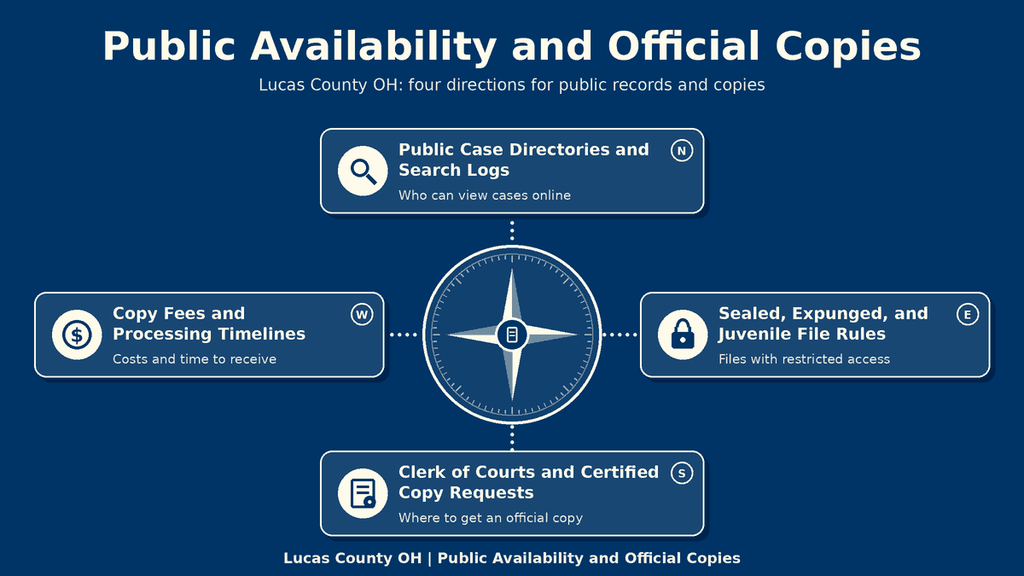
Lucas County’s Online Dockets page states that General Trial Division case details are provided through its county-listed justice case search and research OH services. Availability differs by referencing verified criminal court records databases and case and record type One service may return a case index, another may show docket entries, and document images may require a separate request.
Public Case Directories and Search Logs
- The county’s Online Dockets page serves as the official directory for linked General Trial Division search services.
- A public case directory returns matching case identifiers before the reader opens a particular docket.
- A docket event log lists dated filings, hearings, orders, and status changes in the order recorded by the court.
- research OH is a statewide service named on the Lucas County page. Its results can depend on court participation and source-system updates.
A public case directory is a finding tool. It helps a reader move from a name or case number to the correct matter. The docket event log acts as the public search history of what the court entered, not a complete transcript of every statement made during a hearing. A short event title may be the only public view of a filed paper.
Sealed, Expunged, and Juvenile File Rules
Availability follows Ohio’s Public Records Act, R.C. 149.43, court orders, and confidentiality rules for protected matters. A sealed case or document may not appear in a public search. A record ordered expunged can be unavailable or shown with protected portions removed. Juvenile records have separate confidentiality rules, so a public view can be narrower than the court file.
An empty search result does not prove that no case exists. The case may be sealed, expunged, protected by juvenile rules, recently filed, archived outside the searched collection, or listed under a different party name. The Clerk of Courts can determine which condition applies.
Clerk of Courts and Certified Copy Requests
The Clerk of Courts has custody of the official case file and can confirm whether a paper exists even when the online search does not show it. Ask whether you need an ordinary copy, a certified copy, or a response to a public-records request. A certified copy carries the clerk’s certification that it reproduces an official court record. An ordinary copy has no such certification.
A clear request should identify the case number, caption, document title, filing or entry date, and requested copy type. These details prevent confusion when a party has several cases or when a document title appears more than once in the docket. If the needed item is not available through the search portal, ask the clerk to search the case file or archive.
Copy Fees and Processing Timelines
Ask the Clerk of Courts for the current fee before ordering copies. The amount may depend on the number of pages, certified status, delivery method, and any search or retrieval charge. A fee shown by a third-party website may be outdated and does not establish the county’s official price. Obtain the amount from the court before paying.
A fixed completion time should not be assumed. Processing can depend on the size of the request, certification work, payment verification, delivery choice, and the clerk’s workload. Ask for a current estimate and the accepted payment method when placing the order. Recent-filing delays in an online search are a separate issue from the time required to retrieve and certify an older paper.
Record Accuracy and Search Problems
Online docket accuracy depends on correct search values and current source updates. A failed search often points to a fixable problem with the name, number, court, or update cycle. The case identity fields should be checked before drawing a conclusion about the case.
Matching Party Names and Case Numbers
Case numbers from another court can resemble Lucas County numbers. Include the court or division in every request. If several results have the same caption, compare the filing date and assigned judge. A name match is useful for narrowing the search, but the case number provides the strongest identification.
System Delays for Recent Filings
A newly filed case may not reach a search service as soon as the clerk creates the docket entry. Different document types can appear at different times because the court sends case data to the search system in stages. An empty result for a case filed that day may reflect this update gap rather than a filing problem.
If a hearing, filing deadline, or response date is close, contact the clerk rather than relying on an empty search page. Keep the filing receipt, case number, caption, and filing date ready. Those details let staff locate the matter without a second broad name search.
Unlisted Court File Resolution
Older records may sit in an archive, a prior case-management system, or a collection not covered by the selected online service. The clerk can search internal indexes and retrieve an archived file when the case details are sufficient. A document that was never filed will not appear in the docket, so a request for it can receive a written response stating that no such filing was located.
Some unlisted records exist but cannot be released because of a sealing order, juvenile confidentiality rule, or another legal restriction. The search result and the public-records response can differ. Keep a written log of the case number, document title, requested date, and the clerk’s response so a later request can use the same identifiers.
Official Court Record Verification
An online docket serves as a quick source for status and filing history. A certified copy serves a different purpose because the clerk certifies that it reproduces an official court record. If an online entry conflicts with a filed paper, request the certified copy and compare the exact title, date, judge, and document text.
A screenshot, browser printout, or downloaded file is not a certified copy unless the clerk has added the required certification. Court staff can also confirm whether a document was filed, what disposition was entered, and which version controls when several entries refer to the same action. This check gives legal filings a clear source that can be traced to the court.
Contact Information
Use the Clerk of Courts for case-file searches, certified copies, and requests involving a result that does not appear online. The office maintains court records and provides information about available public access options. Check its official website for search instructions, applicable fees, and document request procedures. For case-specific questions, provide the case number, party name, or filing date when contacting the clerk.
- Address: Clerk of Courts: 700 Adams Street, Toledo, OH 43604
- Phone: 419-213-4484
Frequently Asked Questions
Lucas County court records give quick access to case details, filing dates, and party information. Using the online docket you can confirm a case status, locate hearings, and request certified copies when needed. This service saves time, reduces travel, and helps anyone needing legal proof or research.
How can I search court records by case number in Lucas County?
Visit the official online docket page, enter the case number in the search bar, and click Search. The system returns the case’s current status, assigned judge, and upcoming hearing dates. If the record is recent, wait a few hours for the database to refresh before trying again.
What steps let me find court records by party name?
Open the docket portal, select the “Party Name” tab, type the full or partial name, and press Search. Results list all matches with case numbers and filing dates. Click a case to view detailed docket entries, then note the case number for any document request.
Can I locate public court records online for a civil case?
Yes. Choose “Civil” from the case‑type dropdown on the docket site, then enter the case number or party name. The page shows filings such as complaints, motions, and orders. Some documents may be sealed; those will appear as restricted and require a formal request to the clerk.
How do I request a certified copy of a court document?
After locating the case, note the docket number and contact the Clerk of Courts at 419‑213‑4484 or use the online request form. Pay the fee listed for the document type, then choose mail or in‑person pickup. Processing usually takes 3‑5 business days unless the record is archived.
What should I do if a court record search returns “no results”?
First, verify the spelling of the name or the accuracy of the case number. Check that you selected the correct jurisdiction—Lucas County versus a neighboring county. If the case was filed very recently, wait 24 hours for the system to update. Still no match? Call the clerk’s office for assistance and confirm the filing date.